For family professionals

Give your clients the app they need before the screenshots start piling up

I built The Coparent App because separated families and the professionals helping them should not have to piece everything together from messy messages, missing context and folder after folder of screenshots.

As a professional partner, you can give selected families free access to the app, review records through the professional portal and place your service where parents are already looking for help.

Free client access through seats
One place for records
More visibility for your service
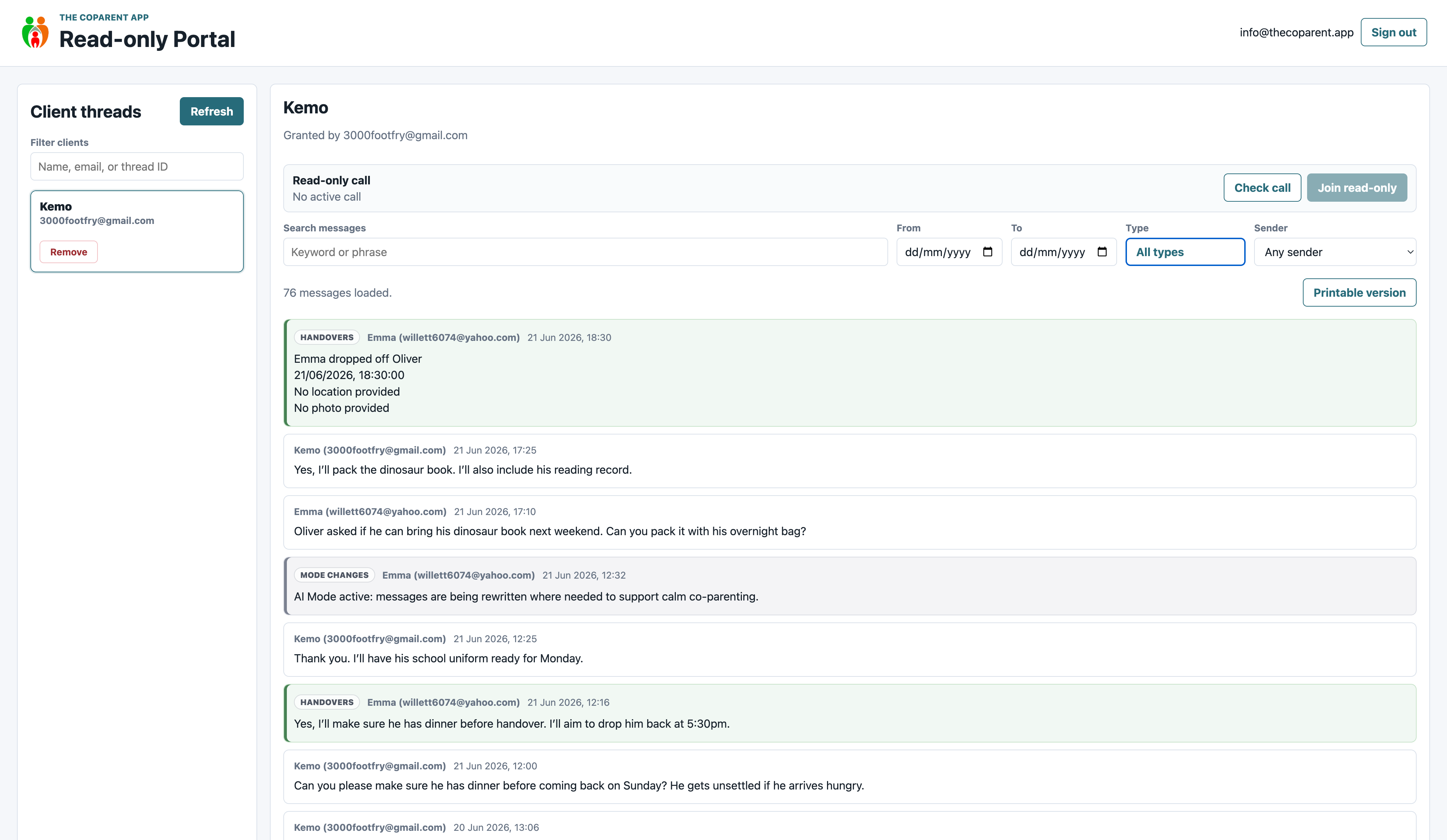
The Coparent App professional portal showing a full family thread
Review the whole picture, not just selected screenshots
1
Get in front of families who already need support

Your service can appear inside the app where separated parents are looking for solicitors, mediators, contact centres and support organisations.

2
Give clients access without them paying

Client seats let you give selected families free app access as part of the support you already offer.

3
See the full record in one place

Review messages, handovers, diary entries, calendar events, photos and documents through the professional portal.

4
Spend less time chasing screenshots

Instead of trying to follow bits of information from several places, you can review clearer records when access has been granted.

This is not just another listing

It is a way to give families a practical tool, make your service easier to find and help professionals work with better context from the start.

Families need proper context, not just screenshots

When parents are stuck using ordinary messaging apps, professionals often end up looking at bits of conversations, missing information, emotional replies and timelines that are hard to follow.

The Coparent App gives families one organised place for messages, handovers, calendar events, expenses, photos, documents and records.

What professionals can use it for

  • Review family records through the read only portal
  • Help clients use a clearer communication structure
  • Give free app access to selected client families
  • Appear in the Get Help section where parents look for support
  • Reduce the need for scattered screenshots and long email chains
  • Keep professional review separate from parent communication

Professional partners do not just tell families about The Coparent App. They can help families start using it by giving them access through client seats.

What professionals can actually see

The professional portal is built for review. Professionals can see the full thread, apply filters and use printable views without changing the family record.

Full family thread in The Coparent App professional portal

Full thread view

See the whole conversation and the surrounding context, instead of relying on selected screenshots.

Filtered review in The Coparent App professional portal

Filtered review

Filter longer records so messages, uploads, handovers, journal entries and other items are easier to review.

Printable record preview from The Coparent App professional portal

Printable records

Use clean printable views when a paper copy or review bundle is needed.

The professional bundle model

The partner offer has two main parts. The first is Professional Network Membership. The second is Client Seat Bundles. This keeps things simple and lets each organisation choose how many families they want to support.

1

Professional Network Membership

This is the professional package. It gives approved professionals access to the partner network, visibility options and the read only portal.

  • Professional partner status
  • Professional portal access
  • Get Help listing or visibility options
  • Useful Forms or resource placement options
  • Professional onboarding resources
  • Ability to give client access through seat bundles
2

Client Seat Bundles

Client Seat Bundles give professionals and organisations the ability to gift access to selected families, so parents can use The Coparent App without paying for it themselves.

  • Free app access for client families
  • Parents do not pay when a professional gives them a seat
  • Useful for supported clients, pilot schemes and referral routes
  • Can grow as demand grows
  • Keeps the public app price protected

Simple pricing formula

The structure is designed to be easy to explain to businesses, charities, firms and family support services.

Bundle part What it covers How it works
Professional Network Membership Portal access, professional status, listing options, partner resources and visibility inside the app. The professional or organisation joins as a member and gets access to the partner benefits.
Client Seat Bundles Client access seats that members can gift to selected families. The member allocates seats from their bundle, so the family can use the app without paying themselves.
Extras Extra visibility, featured placement, custom resources, sponsored form listings or larger client access. Added only when needed.
Total Membership plus Client Seats plus Extras A simple model that separates professional value from family app access.

What professional partners get

A

Read only portal access

Approved professionals can review family records without editing them or joining the parent conversation.

B

Get Help visibility

Your service can appear where parents are already looking for solicitors, mediators, contact centres and support organisations.

C

Free client accounts

Give selected client families access to the app as part of your professional support package.

Professional Portal

The professional portal gives approved professionals secure read only access to family records where access has been granted.

  • Review messages and conversation context
  • View handovers, journal entries and calendar events
  • Review photos, documents and supporting records
  • Use filters to make longer records easier to review
  • Support remote supervised contact where arranged

Client access without client payment

A key part of the partner model is that professional members can give the app to selected clients for free. The family gets access through the member seat bundle, without paying for the app themselves.

This makes the app a practical support tool, a useful referral route and an extra benefit for the professional service.

Parents can grant access from inside the app

The professional portal is designed to work alongside parent control. Families can grant approved professionals read only access, so records can be reviewed without changing the original family record.

Grant read only access screen in The Coparent App

Parent controlled access

Parents can grant access to approved professionals directly from the app.

Why this matters

Professionals get context without being added into the parent conversation. Parents keep a clearer record, while the professional can review what has happened when access has been granted.

  • Parents stay in control of access
  • Professionals cannot edit the record
  • Records remain easier to follow
  • Less time spent gathering screenshots

Your service can appear where parents are looking for help

The Coparent App is not only a communication tool. It also gives parents a place to find family support, legal routes, mediators, contact centres and useful documents.

Get Help categories inside The Coparent App

Get Help

Families can find support categories directly inside the app.

Expanded Get Help category inside The Coparent App

Support listings

Relevant organisations can appear in categories parents already use.

Useful Documents categories inside The Coparent App

Useful Documents

Parents can find forms, resources and useful guidance links.

Parenting plans category inside The Coparent App

Useful resources

Partners can support families with practical resources at the right moment.

Who the Professional Partner Program is for

Family Solicitors

Help clients move away from scattered screenshots and into clearer communication records.

Mediators

Give parents a practical tool to support calmer communication between and after sessions.

Contact Centres

Support supervised contact, handovers and clearer records around arrangements.

Domestic Abuse Support Services

Help clients use structured messaging and safer boundaries where informal communication is difficult.

McKenzie Friends

Support people representing themselves with organised records and clearer timelines.

Therapists and Counsellors

Suggest a practical communication structure for clients dealing with separation conflict.

Social Workers

Review relevant communication history where access has been authorised.

Family Support Organisations

Give app access as part of wider support for separated parents and children.

How partner access works

Apply online

Complete the professional application form so we can understand your role, your organisation and how you support separated families.

Get approved

Professional access is reviewed before portal access, listings or client seats are enabled.

Choose your bundle

Use Professional Network Membership for portal access and visibility, then add Client Seat Bundles if you want to gift app access to families.

Give clients access

Allocate app access to selected families so they can start using the app without paying for it themselves.

Why I want professionals involved

The Coparent App is not just about parents sending messages. It is about helping families keep things clearer, calmer and easier to understand when support is needed.

Professional partners help make that possible. You can give families access to the app, review the record when invited and make sure parents can find the right support without having to search all over the internet at the worst possible time.

For Professionals menu hub

Use this section as the main page for your website dropdown menu.

Why this works for professionals

It adds value between appointments

Professionals can give clients a useful tool they can keep using between sessions, calls or meetings.

It helps parents find support

Listings and resource placement put professional services in front of parents who are already looking for help.

It saves time and confusion

Instead of chasing screenshots, records can be viewed in one organised place when access has been granted.

Frequently asked questions

Do families pay if a professional gives them access?

No. If a professional gives a family a client seat, the family receives access through that professional or organisation.

Is the professional portal read only?

Yes. The portal is for review and oversight. Professionals cannot edit family records or take part in the parent conversation.

Can partners be listed inside the app?

Yes. Professional Network Membership can include visibility through Get Help, Useful Forms or other support areas.

Can organisations choose how many families they support?

Yes. Client Seat Bundles are separate from Professional Network Membership, so organisations can choose a bundle size that suits them.

Give families the app. Give professionals the context.

Join the Professional Partner Program and help separated parents use structured communication, clearer records and child focused tools without relying on ordinary messaging apps.