For domestic abuse support services

Support safer boundaries when communication still has to happen

For many separated parents, abuse does not always end when the relationship ends. Communication about the children can become another place for pressure, control, constant messages, emotional baiting or boundary pushing.

The Coparent App gives families a more structured place for child related communication, with features designed to reduce message pressure, support calmer replies and keep clearer records. As a professional partner, your service can give selected clients access and review records through the professional portal where access has been granted.

Safer structured communication
Clearer records and boundaries
Free client access through seats
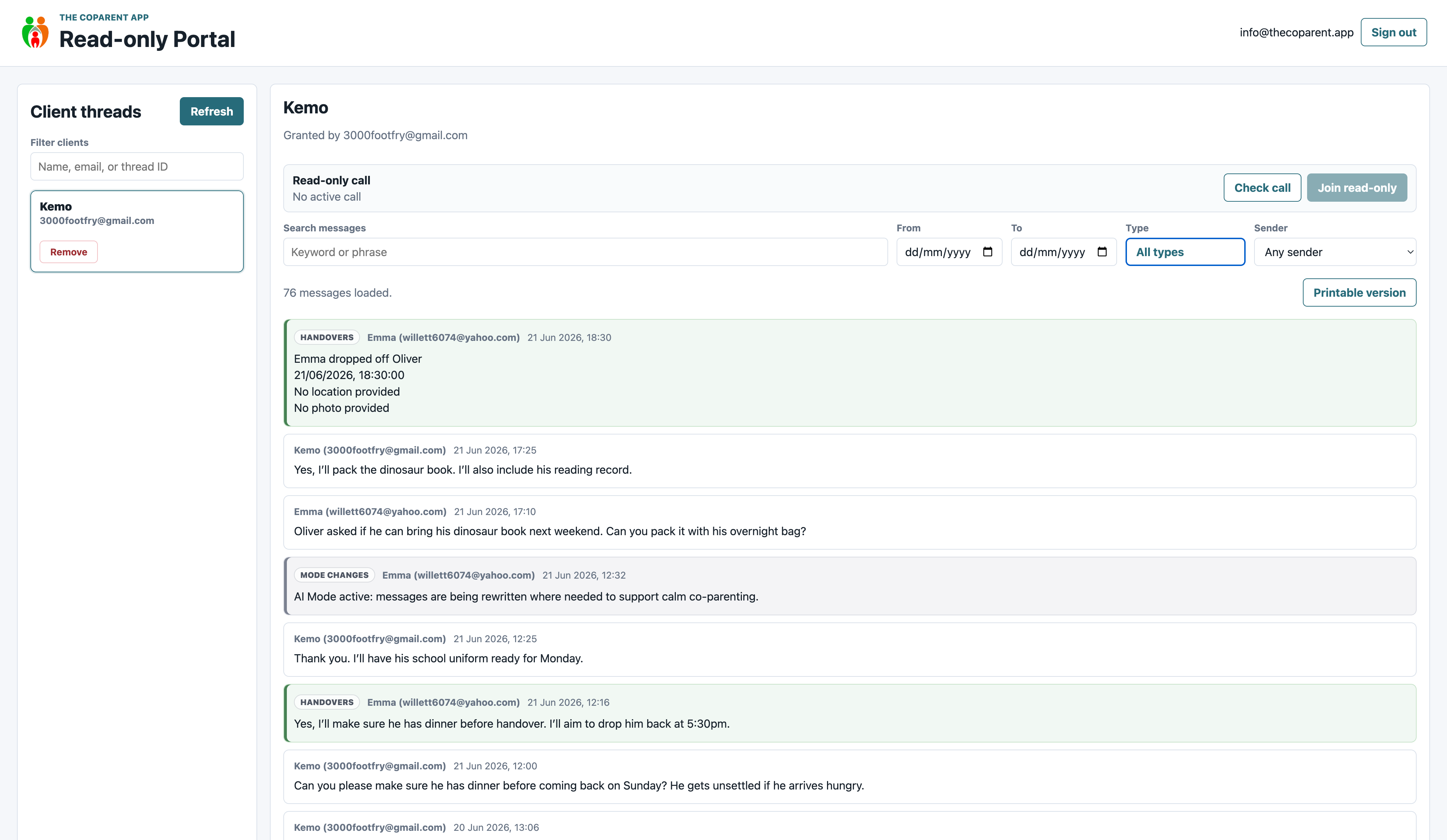
The Coparent App professional portal showing a family record
Review records carefully where access is granted
1
Reduce message pressure

Message limits and structured communication can help reduce constant back and forth when boundaries are being tested.

2
Support calmer replies

AI rewrites can help parents reword difficult messages before sending, keeping replies more child focused and less reactive.

3
Give clients app access

Client seats let professional members give selected families access to the app without the parents paying themselves.

4
Keep clearer records

Important communication, handovers, documents and concerns can be kept in one place instead of scattered across screenshots.

Boundaries matter after separation

The app is built to help parents communicate about the children in a more structured way, without leaving everything inside ordinary messaging apps.

A practical tool for post separation boundaries

Support services often see how quickly ordinary communication can become another source of harm. A message about contact can turn into a demand, a guilt trip, an argument or a way to keep someone emotionally engaged.

The Coparent App helps move child related communication into a more structured space, with clearer records and features designed to reduce pressure rather than fuel it.

Useful for support work involving

  • Post separation abuse concerns
  • High conflict communication
  • Repeated messaging or message pressure
  • Boundary setting around child arrangements
  • Safer records of communication patterns
  • AI assisted message rewrites
  • Quiet Mode for calmer app use
  • Professional review where access has been granted

Designed to support boundaries, not force contact

The Coparent App is for situations where communication about children still needs to happen. It is not about pretending everything is fine. It is about helping families use clearer structure, records and limits where communication is difficult.

Features that matter for safer structured communication

1

Message limits

Message limits can help reduce repeated back and forth when one parent keeps pushing for a response.

2

Quiet Mode

Quiet Mode helps reduce the pressure of constant app attention when a parent needs more breathing space.

3

AI rewrites

AI rewrites can help turn reactive replies into calmer child focused messages before they are sent.

4

One device access

One device access helps keep accounts more controlled and reduces the risk of someone else using the account.

For support services, the value is not just that messages are saved. It is that communication can be made more structured, more limited and easier to review when support is needed.

Professional portal review where access is granted

The professional portal gives approved professionals read only access to family records where permission has been granted. For domestic abuse support services, this can help with careful review of communication patterns, boundaries, repeated messages and practical arrangements.

Professional review should be used carefully and appropriately, with the client in control of access.

Full family thread in The Coparent App professional portal

Full record view

Review communication in wider context, instead of relying only on selected screenshots.

Filtered review in The Coparent App professional portal

Filtered review

Filter longer records so messages, uploads, handovers and other items are easier to review.

Printable record preview from The Coparent App professional portal

Print ready views

Use cleaner printable records where a paper copy, support note or professional review pack is needed.

Client seats for supported families

Professional members can use Client Seat Bundles to give selected families access to The Coparent App. The family receives access through the professional member, so parents do not have to pay for the app themselves.

For domestic abuse support services, this can help clients move away from ordinary messaging apps and into a more structured system where the focus stays on the children and the record is clearer.

Professional access stays read only

Support workers can review records where access has been granted, but they cannot edit messages or join the parent conversation through the portal.

  • Read only professional review
  • Client controlled access
  • No editing of family records
  • Useful for reviewing patterns and boundaries
  • Careful oversight without becoming part of the conversation

Remote supervised call support

In some situations, voice or video contact may need extra structure. Where it is suitable, agreed and safe, professional access can support watch or listen only call oversight.

This should always be handled carefully, with the right support, boundaries and consent in place.

Use with care where safety is the priority

This feature will not be suitable for every family. Where it is used, it should support safer structure, not increase pressure on the client or expose them to more unwanted contact.

  • Call oversight where suitable
  • Useful for structured remote contact
  • Professional role stays separate
  • Works alongside written records and boundaries

Clients can grant access from inside the app

Clients can grant approved professionals read only access from inside the app. This keeps control with the client while allowing support services to review relevant records where permission has been given.

Grant read only access screen in The Coparent App

Client controlled access

Parents can grant access to approved professionals directly from inside the app.

Why this matters for support services

Access should never feel like another loss of control. The client can decide who has read only access, while the professional can review relevant records where access has been granted.

  • Clients control professional review
  • Professionals cannot edit records
  • Review stays separate from parent communication
  • Communication patterns are easier to understand

Your support service can appear where parents are looking for help

Parents using the app may be dealing with post separation abuse, coercive control, difficult communication or unsafe boundaries. Professional Network Membership can help your service appear in support areas where families are already looking for help.

Get Help categories inside The Coparent App

Get Help

Support services can appear in relevant help categories inside the app.

Expanded Get Help category inside The Coparent App

Support visibility

Your service can be visible when parents are looking for practical help.

Useful Documents categories inside The Coparent App

Useful Documents

Parents can find resources, forms and guidance links inside the app.

Parenting plans category inside The Coparent App

Planning resources

Families can find practical resources when arrangements need more structure.

Support problems this can help with

Constant messaging

Message limits can help reduce repeated back and forth when one parent is using messages to apply pressure.

Reactive replies

AI rewrites can help clients reply in a calmer way without being pulled into the emotion of the message.

Boundary pushing

A structured app can help keep communication focused on the children and practical arrangements.

Scattered evidence

Messages, uploads, handovers and documents can be kept together for clearer professional review.

How partner access works for support services

Apply online

Complete the professional application form so we can understand your service, your role and how you support separated families.

Professional access is reviewed

We review professional access before portal access, visibility options or client seats are enabled.

Choose the partner setup that fits your service

Use Professional Network Membership for portal access and visibility, then add Client Seat Bundles if your service wants to give app access to clients.

Support clients with safer structure

Offer The Coparent App to selected clients so child related communication, boundaries and records can be managed in one place.

Why I think this matters for domestic abuse support services

When communication itself becomes part of the problem, asking someone to just keep messaging normally is not enough. People need boundaries, structure and a way to avoid being pulled into constant arguments.

The Coparent App gives families a more controlled place for child related communication, with features that can help reduce pressure and keep records clearer. For support services, it can be a practical tool to offer where communication still has to happen, but it needs better boundaries around it.

Frequently asked questions

Can support services review family records?

Approved professionals can review records through the professional portal where the client has granted access. The portal is read only.

Can clients use the app for free?

Yes. Professional members can use Client Seat Bundles to give selected families access, so parents do not have to pay for the app themselves.

How does the app support boundaries?

The app supports boundaries through structured communication, message limits, Quiet Mode, AI rewrites and clearer records in one place.

Can professionals use watch or listen only call access?

Where it is suitable, agreed and safe, professional access can support remote supervised call options, including watch or listen only access.

Can a support service be listed in the app?

Yes. Professional Network Membership can include visibility in support areas where separated parents are already looking for help.

Support safer communication with clearer boundaries

Join the Professional Partner Program and help separated parents use structured communication, message limits, calmer replies and clearer records when communication still has to happen.