
For Family Solicitors
Give clients a better way to build the record your team may later need to review.
Provide selected clients with structured communication from the beginning of a matter, reduce the friction of collecting scattered material, and review clearer chronological context when a client grants access.
The practical problem
Client instructions can arrive across email, screenshots, documents and memory. A structured record does not decide the legal issues, but it can make the relevant chronology easier to understand.
What a paid plan changes
Less administrative friction around scattered screenshots
A practical client-care benefit from the start of a matter
Visibility among parents looking for family-law support
See the workflow
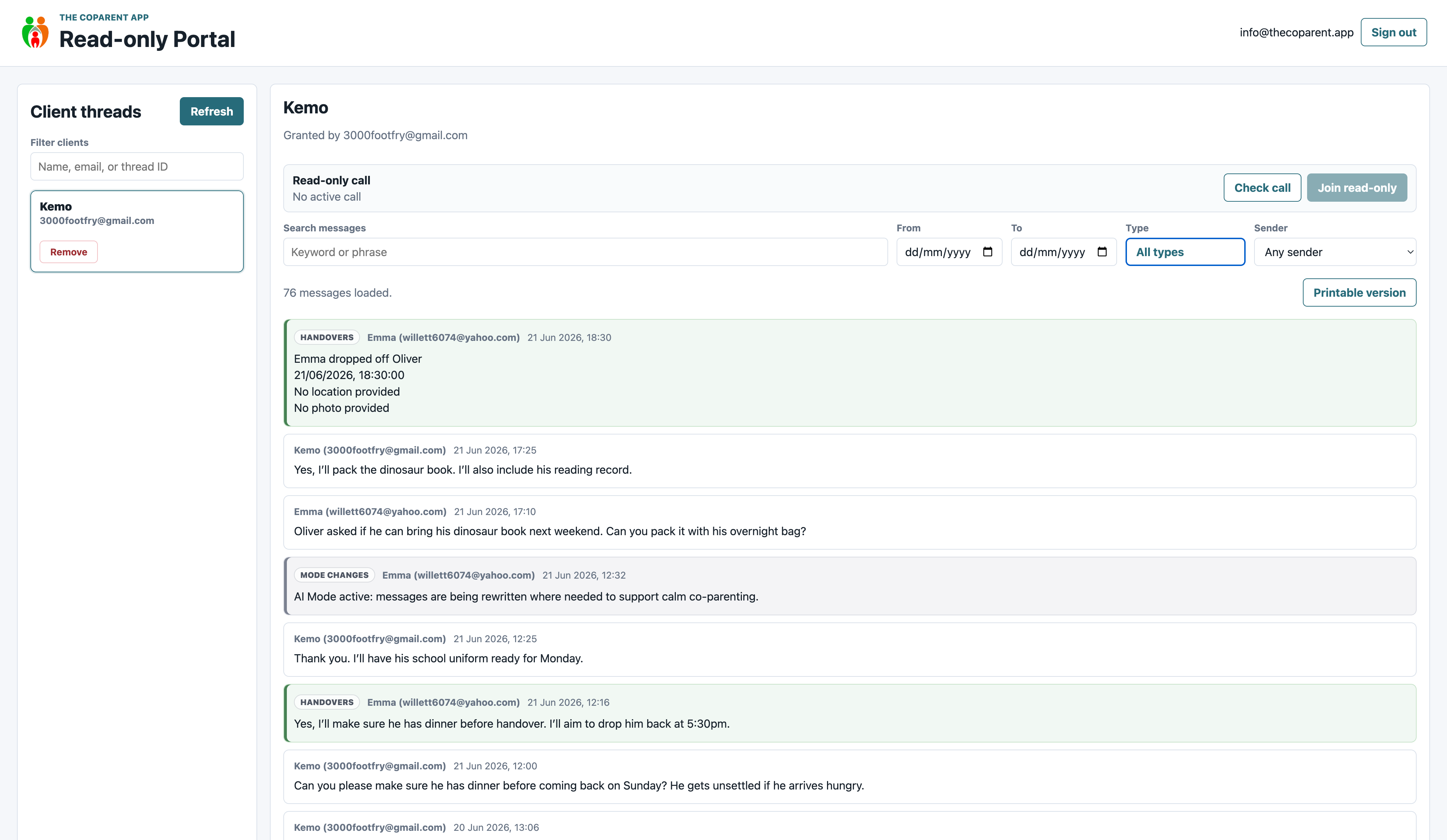
Review organised records when a parent grants access.
The portal can show the wider thread and surrounding context. It does not decide what is relevant, create court-approved evidence or replace your professional judgment.
How it fits
From client setup to read-only review
At opening
Choose appropriate clients and allocate an included active family seat.
During the matter
The linked family uses one structured system for communication and relevant records.
For review
The client separately grants your verified account read-only access.
At closure
Revoke sponsored app access and reuse the released capacity for another active family.
Free access and paid plans
Viewing a record is free. Providing the app and promoting your service are paid.
Free Professional Access
- Verified professional account
- Read-only portal access after parent permission
- No active family seats
- No Get Help business listing or promotional benefits
Paid Professional Partner Plan
- Professional dashboard
- Included concurrent active-family capacity
- Allocate, revoke and reuse family seats
- Category-specific paid Get Help placement once reviewed and manually published
- Logo, tagline and tracked campaign parameters on the outbound link
Featured Partner — paid placement. Paid placement is advertising and is not legal, professional or safeguarding endorsement.
Recommended starting plan
Professional: 10 active client families — £90/month
One active family seat covers both parents in one linked family. Seats are concurrent capacity: revoke sponsored access when support ends and reuse the released capacity.
Paid visibility
What a paid Get Help placement currently includes
Category-specific placement
Emma manually publishes your listing in the relevant Get Help category after reviewing the submitted details.
Plan-based position
Higher-tier paid plans are placed above lower-tier paid plans and basic commercial entries. Essential public-interest resources remain available.
Logo, tagline and website action
The checkout collects your logo, website, category and short tagline. Outbound links include UTM campaign parameters for referral identification in your own analytics.
No exclusivity or guaranteed enquiries. The current service does not include a partner analytics dashboard or monthly performance report. Those benefits will not be advertised until the supporting reporting exists.
“Featured Partner — paid placement” identifies advertising. It does not mean The Coparent App has endorsed or guaranteed a provider, its advice, outcomes or safeguarding practice.
Frequently asked questions
Clear answers before you choose
Are records automatically admissible?
No. The app organises records; admissibility and weight remain matters for the relevant legal process and professional advice.
Is the app court approved?
No, and the website does not claim that it is.
Does one seat cover the linked family?
Yes. One active family seat covers both parents in one linked family.
Can clients control professional access?
Yes. Read-only professional review is separate from sponsored app access and begins only when a parent grants permission.
Give clients a better way to build the record your team may later need to review.
Start with the smallest plan that covers the number of client families you want to support at one time.