Help parents leave mediation with more than good intentions
Mediation can help parents agree what needs to happen. The harder part is what happens afterwards, when real life starts again and the same old messages, missed replies and misunderstandings creep back in.
The Coparent App gives separated parents a practical place to put agreements into daily use. As a professional partner, you can give selected families access to the app, help them keep communication clearer and review records through the professional portal where access has been granted.
Give families one place to manage contact times, handovers, expenses, updates and child related messages after mediation.
The app helps parents move away from ordinary messaging apps where emotion, confusion and missing context can quickly take over.
Client seats allow professional members to give selected families access, so parents can start using the app without paying themselves.
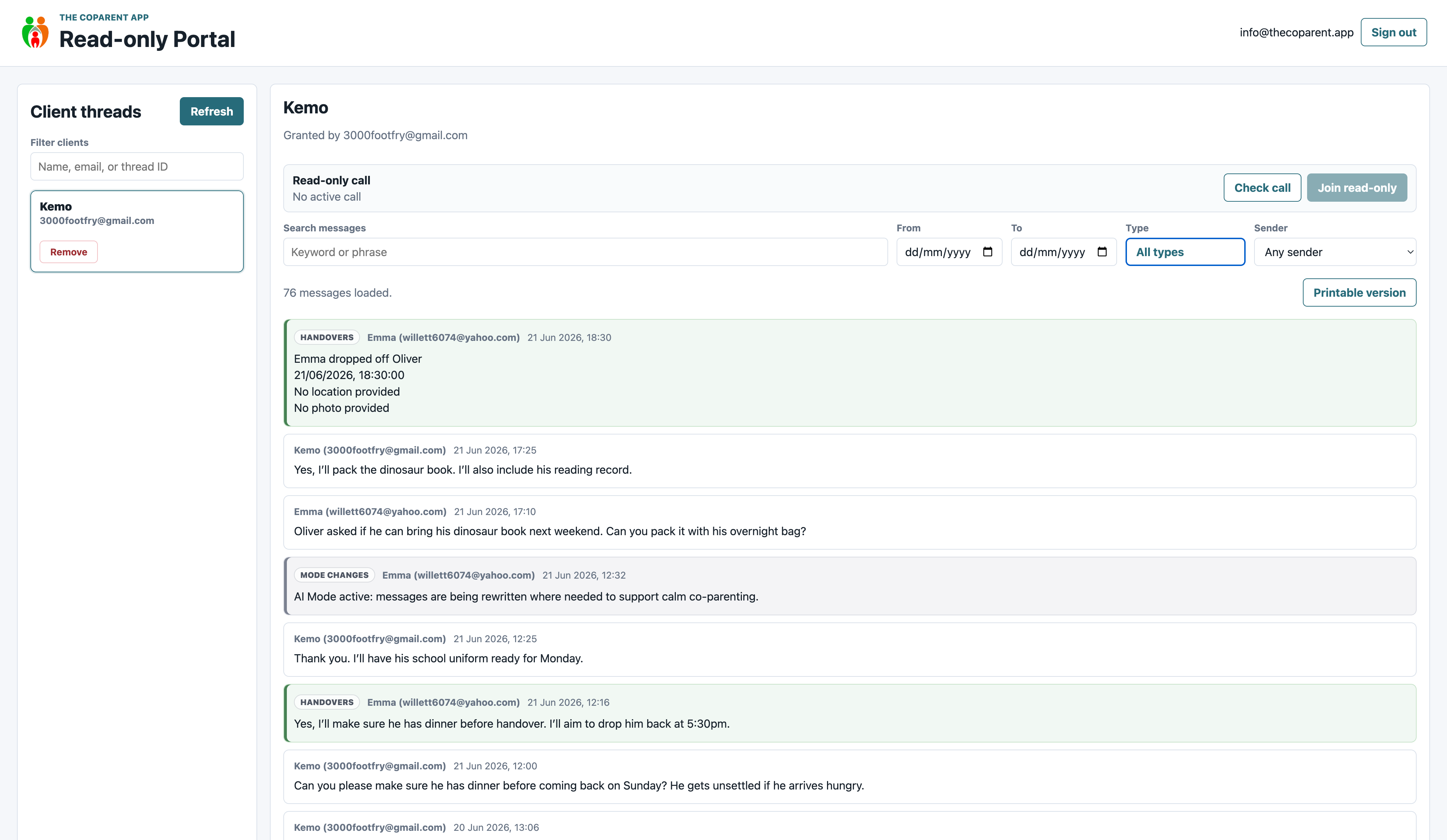
The professional portal is read only, so mediators can review records where access has been granted without becoming part of the parent conversation.
Mediation should not end at the door
The Coparent App gives parents something practical to use between sessions and after mediation, so arrangements have a better chance of staying clear in real life.
Why mediators need a practical next step
Parents can leave a session with a clearer plan, but if they go straight back to messy messages, the same problems can return very quickly.
The Coparent App gives families a calmer structure for the day to day details that often create tension. It helps parents keep child arrangements, handovers and updates in one place, instead of relying on memory, screenshots and scattered messages.
Useful after mediation sessions
- Shared calendar events for child arrangements
- Clearer messages between parents
- Handovers and practical updates in one place
- Expenses, receipts, photos and documents
- Professional review where access has been granted
- Remote supervised call support where suitable
- Client access through professional seat bundles
The app helps parents keep using the structure you have helped them agree, long after the session has finished.
What mediators can review when access is granted
The professional portal is designed for review. It helps approved professionals see records in context without editing anything and without taking part in parent messages.
For services that need it, professional access can also support remote supervised call options, including watch or listen only access where appropriate.
Full thread view
See the wider conversation and the surrounding context, instead of relying on selected screenshots.
Filtered review
Filter longer records so messages, uploads, handovers, journal entries and other items are easier to review.
Printable records
Use clean printable views when a paper copy or review bundle is needed.
How The Coparent App supports mediation work
Before sessions
Where access has been granted, records can help show what communication has looked like and where the sticking points are.
Between sessions
Parents can use one structured place for messages, arrangements, handovers and updates while mediation is still ongoing.
After sessions
Families can keep using the app to support the arrangements discussed during mediation, reducing the chance of everything slipping back into old habits.
Give families access without asking them to pay
Professional members can use Client Seat Bundles to give selected families access to The Coparent App. This means parents can start using the app as part of the support pathway, without paying for it themselves.
For mediation services, this can make the app feel like a practical part of the process, rather than another thing parents are being asked to go away and buy.
Keep mediation neutral
The professional portal is read only. It lets approved professionals review records where access has been granted, but it does not let them change the record or become part of the parent conversation.
- Review without editing
- See records in context
- Keep parents responsible for their own communication
- Support watch or listen only call oversight where appropriate
- Support clearer discussions when needed
Remote supervised call support
Some services need more than written records. Where it is suitable, agreed and safe, professional access can support watch or listen only call oversight.
This gives professionals a way to support contact arrangements without becoming an active participant in the call.
Why this is useful for some mediation services
It will not be needed in every case, but it can be helpful where a family needs extra structure around calls, contact arrangements or professional oversight.
- Useful where contact needs more structure
- Supports professional oversight where agreed
- Keeps the professional role separate from the parent conversation
- Works alongside the wider record inside the app
Parents can grant access from inside the app
Families can grant approved professionals read only access, so records can be reviewed without changing the original family record.
Parent controlled access
Parents can grant access to approved professionals directly from inside the app.
Why this matters for mediation
Parents stay in control, while mediators can review records where access has been given. It keeps the process clearer without pulling the mediator into the parent conversation.
- Parents decide who can review
- Professionals cannot edit records
- Information is easier to follow
- Less time spent untangling screenshots
Your mediation service can appear where parents are looking for help
The app includes support areas where parents can find professional services, guidance and useful resources. This means mediation services can be visible at the point families are already looking for help.
Get Help
Families can find support categories directly inside the app.
Support listings
Relevant services can appear in categories parents already use.
Useful Documents
Parents can find forms, resources and useful guidance links.
Parenting plans
Families can find useful planning resources when arrangements need structure.
Common mediation problems this helps with
Repeated misunderstandings
Parents can keep child related messages and practical updates in one clearer place.
Unclear handovers
Handover details, timings and child updates can be recorded more consistently.
Agreements not followed
Calendar events and records make it easier for parents to keep track of what was agreed.
Too many screenshots
Records can be reviewed in one place when access has been granted, rather than pieced together from selected images.
How partner access works for mediators
Apply online
Complete the professional application form so we can understand your mediation service and how you support separated families.
Get approved
Professional access is reviewed before portal access, listings or client seats are enabled.
Choose your partner setup
Use Professional Network Membership for portal access and visibility, then add Client Seat Bundles if you want to gift app access to families.
Give families a practical next step
Offer The Coparent App to selected families so they can use a clearer structure during or after mediation.
Why I think this matters for mediators
Mediation can give parents a way forward, but families still need something practical when the session ends. Without that, it is too easy for parents to fall straight back into the same messaging habits that caused problems in the first place.
The Coparent App gives families a place to keep communication, arrangements and records clearer. For mediators, it can be a simple way to support parents between sessions, after sessions and during those awkward moments where everyone knows what was agreed, but nobody knows where it was written down.
Frequently asked questions
Can mediators see parent messages?
Approved mediators can review records through the professional portal only where access has been granted. The portal is read only.
Can mediation clients use the app for free?
Yes, professional members can give selected families access through Client Seat Bundles, so the parents do not pay for the app themselves.
Can mediators use watch or listen only call access?
Where it is suitable, agreed and safe, professional access can support remote supervised call options, including watch or listen only access.
Does the app replace mediation?
No. The app supports the practical communication and record keeping around family arrangements. Mediation remains the professional support process.
Can a mediation service be listed in the app?
Yes. Professional Network Membership can include visibility through Get Help, Useful Forms or other support areas inside the app.
Give parents a calmer way to carry mediation into real life
Join the Professional Partner Program and help separated families use clearer communication, better records and practical tools between sessions and after mediation.